
How Does WiFi Work on Planes A Traveler's Guide
Settle into your seat, pull out your laptop, and connect to the internet just like you would at your favorite coffee shop. It sounds simple, but how does it actually work?
In short, in-flight Wi-Fi connects the plane to the internet using either satellites orbiting Earth or a network of specialized cell towers on the ground below. That signal is then beamed throughout the cabin, pretty much like your router does at home.
How Your Plane Becomes a Flying Hotspot
The ability to stream movies at 35,000 feet feels like pure magic, but it’s really just a brilliant feat of engineering. The real challenge is turning an airplane—a metal tube moving at over 500 miles per hour—into a reliable mobile hotspot. Airlines pull this off using two primary methods, each with its own pros and cons.
This whole setup turns the aircraft into a bridge between the global internet and your device. The system is designed to hand off the connection from one satellite or ground tower to the next so smoothly that you never even notice. It's a bit like your car radio seamlessly switching between broadcast towers on a long road trip, but instead of music, it's juggling your email and Netflix queue.
The Key Parts of an In-Flight Wi-Fi System
To really get how Wi-Fi works on a plane, you just need to know the three key players working together to get you online.
- The External Antenna: This is the big kahuna. It’s a dome-shaped antenna on the outside of the plane that physically catches the internet signal from space or the ground.
- The Onboard Server: Think of this as the brains of the operation. It takes the signal from the antenna, manages all the data, and handles the login page where you enter your credit card details.
- The Cabin Network: These are the small wireless access points, tucked away in the ceiling panels throughout the cabin, that broadcast the Wi-Fi signal. This is what your phone, tablet, or laptop actually connects to.
The goal is to provide a consistent internet experience, turning what used to be a disconnected gap in your day into a chance to work, stream, or stay in touch with family and friends on the ground. This technology has completely changed what it means to travel.
The Two Technologies That Power In-Flight WiFi
Ever wonder how you can stream a movie or answer an email while cruising miles above the clouds? It all comes down to two surprisingly different engineering solutions. Airlines pick one based on their flight paths, the performance they want to offer, and, of course, the cost.
This diagram gives you a bird's-eye view of the signal path—from a source on the ground or in space, to the plane, and finally down to your laptop or phone.
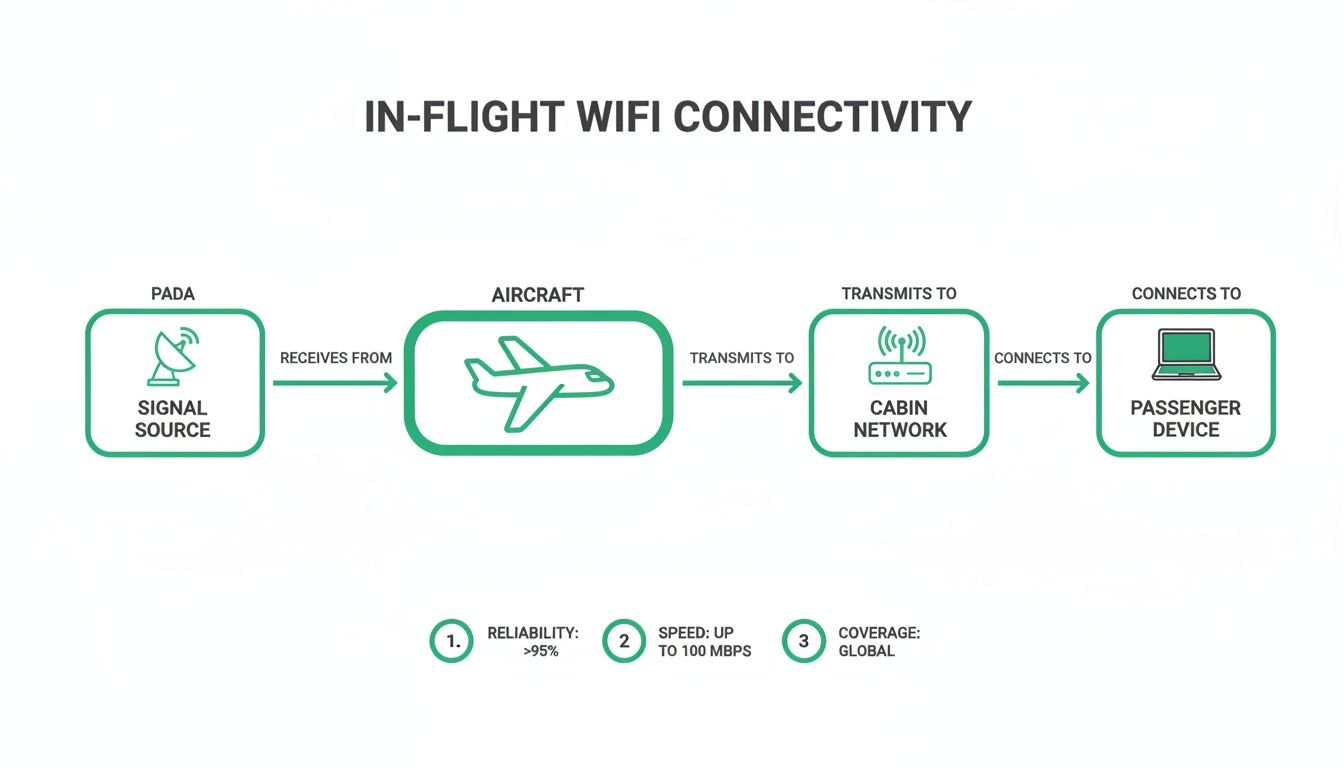
As you can see, the core challenge is grabbing an external signal, processing it onboard, and then blanketing the cabin with a wireless network for everyone to use. Let's break down how each of the two main systems pulls this off.
H3: The Air-to-Ground Method
The first approach is the Air-to-Ground (ATG) system. The easiest way to think about it is as a supercharged version of your phone's cellular connection, but for an entire airplane.
Instead of your phone hitting a single cell tower, an antenna on the belly of the aircraft connects to a network of specialized towers on the ground. As the plane zips across the country, it seamlessly hands off the connection from one tower to the next, just like your phone does when you're driving down the highway.
Because it relies on a physical network of towers, ATG only works for flights over land where that infrastructure exists. This makes it a popular and reliable choice for many domestic routes in places like North America. The big win here is lower latency—or less lag—because the signal is traveling a much shorter distance than it does with satellites.
H3: Satellite Connections in the Sky
The second, and far more common method for international travel, is satellite WiFi. This is the magic that keeps you connected over oceans, polar routes, and other remote corners of the globe where ground towers are just a fantasy.
For this system to work, a small, dome-shaped antenna is mounted on top of the plane's fuselage. This "hump" you might see on some aircraft is constantly tracking and maintaining a direct line of sight with satellites orbiting thousands of miles above the Earth.
So, when you're on a long-haul flight from New York to London and get online at 35,000 feet, you have satellite tech to thank. These systems beam internet signals from geostationary satellites orbiting over 22,000 miles away directly to that antenna on your plane. If you're curious about the business side of it, you can explore more on the growing in-flight connectivity market with data from Intel Market Research.
There are a few different flavors of satellite systems you might encounter:
- Ku-Band: This is the established workhorse of the industry. It offers reliable, widespread coverage and has been the go-to for many international airlines for years. It's not the fastest, but it gets the job done.
- Ka-Band: A newer generation that delivers a serious speed boost, making things like video streaming much more feasible. It's quickly becoming the standard for airlines that want to offer a premium, high-performance connection.
- Low Earth Orbit (LEO): This is the new frontier. Companies like Starlink are deploying thousands of satellites orbiting much closer to Earth. This drastically cuts down latency and promises speeds that feel much closer to your home broadband.
Here's a quick look at how the two main technologies compare side-by-side.
H3: Air-to-Ground vs Satellite WiFi At a Glance
This table breaks down the key differences between the two main technologies powering your in-flight connection, from how they work to where you'll find them.
| Feature | Air-to-Ground (ATG) | Satellite WiFi (GEO/LEO) |
|---|---|---|
| How It Works | Connects to a network of cell towers on the ground | Connects to satellites orbiting thousands of miles above Earth |
| Antenna Location | Underneath the aircraft (on the belly) | On top of the aircraft (in a dome) |
| Geographic Coverage | Limited to overland routes with tower infrastructure | Global coverage, including over oceans and remote areas |
| Best For | Domestic flights (e.g., within the U.S.) | International, long-haul, and transoceanic flights |
| Latency | Lower (less lag) due to shorter signal distance | Higher (more lag), especially with older satellite tech |
| Typical Speeds | Good for browsing and email, but can struggle with streaming | Varies from basic to very high-speed (Ka-Band/LEO) |
Ultimately, whether the signal is coming from 10 miles below or 22,000 miles above, the goal is the same: deliver a stable internet connection to a metal tube moving at over 500 miles per hour. The technology an airline chooses directly shapes the speed, reliability, and cost you'll experience from your seat.
How the Signal Gets From the Antenna to Your Device
So, the internet signal has made its incredible journey to the plane, either zipping up from the ground or beaming down from space. But the job's not done yet. The last, crucial step is getting that connection from the outside of the aircraft to the phone or laptop in your hands. This is where the raw signal becomes the personal hotspot you see at your seat.
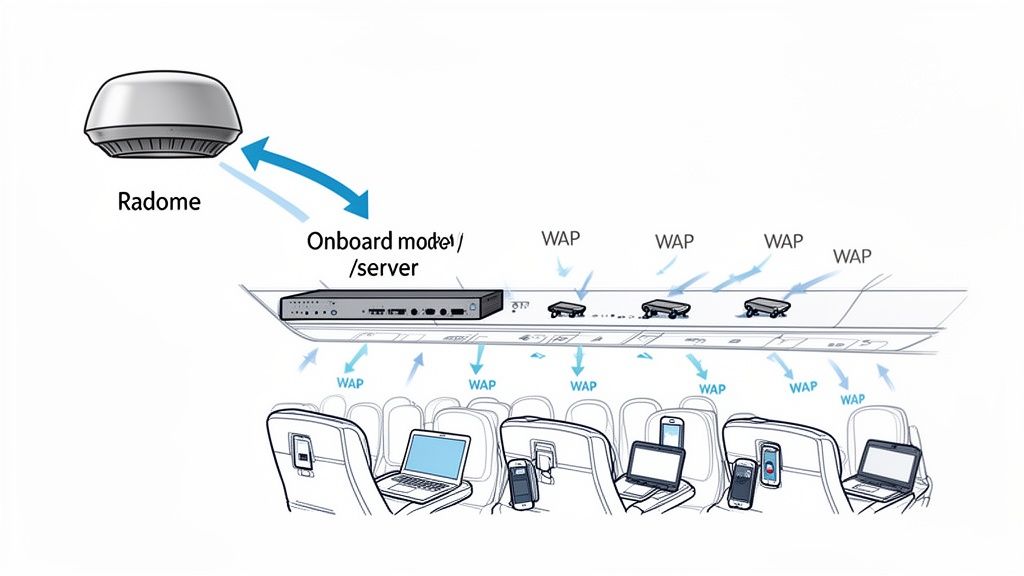
Think of the airplane as a tiny, self-contained local network hurtling through the sky—kind of like your office Wi-Fi, but engineered to handle the wild physics of flight.
It all starts with that external antenna, which sits inside a tough, aerodynamic bubble called a radome. This protective shell is completely transparent to radio waves, letting the signal pass through untouched while shielding the delicate hardware from harsh weather and speeds over 500 mph.
From Radome to Router
Once the antenna grabs the signal, it's sent through secure cables to a small suite of electronics that acts as the plane's internet brain. The key players here are an aircraft modem and an onboard server, which work together to make sense of the incoming data.
This server does all the heavy lifting. It manages who gets online after buying a Wi-Fi pass and, more importantly, divvies up the limited bandwidth so that one person streaming a movie doesn't bring the whole network to a crawl. It’s a constant balancing act, trying to give dozens of people a decent connection from a single, shared pipe.
This entire onboard system—the antenna, modem, server, and access points—is a highly specialized piece of kit. It costs airlines a small fortune to install and maintain on each plane, which is a big reason why in-flight Wi-Fi can feel so expensive.
Broadcasting Throughout the Cabin
Okay, the signal has been processed and managed. The final piece of the puzzle is broadcasting it so your devices can actually connect. This is handled by a series of Wireless Access Points (WAPs).
These are small devices tucked away in the ceiling panels, spaced out along the length of the cabin. They do the exact same job as your Wi-Fi router at home: they create the local wireless network that pops up on your screen (like "DeltaWiFi" or "AA-Inflight").
By using multiple WAPs, airlines make sure the signal is strong whether you're in seat 1A or 42F. It gets rid of dead zones and gives everyone a reliable connection point. When you finally log in, you're hopping onto this internal network, which is your gateway to the global internet via that powerful antenna on the outside of the plane.
What to Expect From In-Flight Connection Speeds
Before you pull out your credit card for an in-flight Wi-Fi pass, it pays to set some realistic expectations. The experience is rarely a carbon copy of your home broadband, and performance can swing wildly from one airline to another—even between different planes in the same fleet. How the Wi-Fi actually works on your plane is the single biggest factor in the quality you'll get.
Some of the newest planes, kitted out with the latest Ka-band or LEO satellite systems, can actually deliver speeds over 100 Mbps. That’s more than enough to stream a movie in HD, jump on a video call, or download big files. But on the flip side, older systems might struggle to do much more than send an email, so it’s worth checking what tech your airline uses if you’re counting on a solid connection.
Speed Isn't the Whole Story—Let's Talk Latency
When we talk about internet performance, speed is only half the picture. The other critical piece of the puzzle is latency—the time it takes for data to travel from your laptop to a server and back again. You’ve probably felt it as "lag" during a video call or while playing an online game.
With satellite internet, this delay is naturally higher simply because the signal has to travel thousands of miles up into space and back down. For a traditional geostationary satellite, that round trip for your data is nearly 90,000 miles. That physical distance introduces a noticeable delay, even if the actual connection speed (your bandwidth) is high.
This means that even with a fast connection, things that need real-time interaction, like competitive online gaming or a fast-paced video conference, might feel a bit sluggish. For almost everything else—streaming, browsing, or sending emails—you'll hardly notice it.
The In-Flight Wi-Fi Arms Race
The good news is that the whole industry is getting better, fast. The big legacy carriers have led the charge, with 89% now offering Wi-Fi, while low-cost airlines are catching up at 57%. That gap is closing quickly as newer, more efficient tech becomes cheaper to install.
Emerging LEO satellite networks like Starlink are completely changing the game, slashing costs and pushing speeds to between 100-200 Mbps per plane. If you want to get into the weeds on these trends, Aerospace Global News has some great insights on how these new networks are shaking things up.
Low-Earth orbit satellites, flying just 340 miles up, work their low-latency magic (under 100ms) with a dense web of thousands of tiny satellites. As the plane flies, the signal is seamlessly handed off from one satellite to the next.
How Much Is This Going to Cost Me?
The price of in-flight Wi-Fi can be just as varied as its performance. Airlines have a few different ways of charging for it, and knowing the options can help you get the best bang for your buck.
Here’s what you’ll typically run into:
- Free Messaging Plans: A growing number of airlines now offer free access to messaging apps like WhatsApp, iMessage, and Facebook Messenger. It’s perfect for staying in touch without buying a full pass.
- Tiered Packages: You'll often see different plans based on what you want to do—think a one-hour pass, a browsing-only plan, or a premium streaming plan. This lets you pay for just the level of service you actually need.
- All-Flight Passes: For long-haul flights or if you need to stay productive the whole time, a pass that covers the entire trip is usually the most cost-effective option.
At the end of the day, once you understand how speed, latency, and cost all play together, you can make a smarter decision and pick a Wi-Fi plan that actually fits what you need for the flight ahead.
Staying Secure While Using In-Flight Wi-Fi
Connecting to the internet at 35,000 feet is a modern marvel, but that Wi-Fi network is about as private as a public park bench. Just like the connection at your local coffee shop, you’re sharing it with everyone else on board.
That means taking a few simple steps to protect your personal information is a must. Think of it less as your own private line and more as a digital town square.
Your single best defense for online safety in the air is a Virtual Private Network (VPN). A VPN acts like a secure, encrypted tunnel for all your internet traffic. It scrambles your data, making it completely unreadable to anyone else who might be snooping on the same network. Whether you’re sending work emails or just scrolling through social media, it keeps prying eyes out.
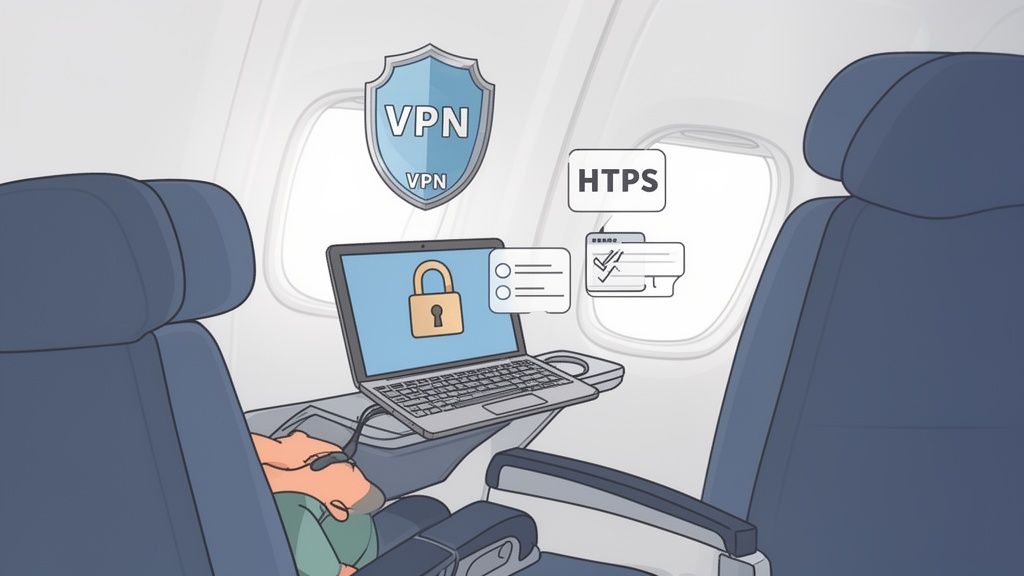
Beyond a VPN, it's all about practicing good digital hygiene. These habits will keep you safe on any public network, not just on a plane.
Smart Browsing Habits for Travelers
- Stick to Secure Websites: Always look for "HTTPS" at the start of a website's address. That "S" stands for secure, and it means the connection between your browser and the site is encrypted. Most modern browsers even show a little padlock icon to confirm you're safe.
- Avoid Sensitive Logins: It’s a good rule of thumb to avoid logging into highly sensitive accounts, like your online bank or financial portals. Save those critical tasks for a trusted, private network once you land.
- Be Mindful of What You Share: Think twice before entering personal details or credit card information on non-essential websites. If you have to make a purchase, double-check that the site is secure and reputable. This is especially true for business travelers, as secure connection habits should go hand-in-hand with corporate travel policy best practices.
By combining a VPN with these straightforward habits, you can confidently use the internet while flying. It’s all about creating layers of protection that allow you to stay connected without putting your digital security at risk.
And one last thing—remember that your phone's cellular connection and the in-flight Wi-Fi are completely separate. Once you land, you'll need a plan for mobile data. For tips on that, check out our guide on how to turn on data roaming.
Combining In-Flight Wi-Fi with Your Travel eSIM
For anyone who travels often, staying connected feels like its own separate journey. This is where a simple but brilliant strategy comes into play: pairing in-flight Wi-Fi with a travel eSIM. It’s the secret to creating a seamless, uninterrupted internet connection from the moment you leave home.
Think about how a typical travel day unfolds. You use your regular mobile data at the airport, then hop onto the plane's Wi-Fi network once you're cruising at 35,000 feet. But the real magic happens when you land. The second you switch off airplane mode, your pre-installed travel eSIM automatically finds and connects to a local network.
No more hunting for a decent airport Wi-Fi signal or fumbling with tiny plastic SIM cards. This approach gives you total connectivity, from your front door to your hotel lobby.
Your Travel Day, Uninterrupted
- At the Airport: Stick with your normal cellular data to check gate changes or download one last podcast.
- During the Flight: Buy an in-flight Wi-Fi pass to catch up on emails or just stream some music.
- Upon Landing: Your travel eSIM kicks in instantly, giving you the data you need to call a rideshare or pull up a map to your hotel.
This door-to-destination strategy is easily the smartest way to make sure you're never offline. It completely removes the stress of finding connectivity and lets you just focus on the trip itself.
Getting a handle on how these digital tools work can make your travels so much smoother. If this is new to you, it's worth taking a few minutes to learn more about how travel eSIMs work and why they’ve become a must-have for so many global travelers.
Common Questions About WiFi on Planes
Even after getting the technical rundown, you probably still have some practical questions about how Wi-Fi actually works on a plane. Let’s tackle some of the most common ones that come up before a flight.
Why Is Airplane WiFi So Expensive?
That high price tag isn’t just an airline capitalizing on a captive audience. It costs a small fortune to get a single plane kitted out with the right antennas, radomes, and servers—often running into the hundreds of thousands of dollars per aircraft.
Then you have to factor in the sky-high cost of satellite bandwidth and the constant, complex maintenance needed to keep an entire global fleet online. Those expenses add up fast for the airlines.
Simply put, providing internet at 35,000 feet requires specialized, durable, and costly technology. From installation to satellite data fees, every part of the process is a significant investment for the airline, which is reflected in the price of your pass.
Can I Make Calls or Use Cellular Data?
Nope. Federal regulations require all phones to be in airplane mode during the flight. This is non-negotiable, as it switches off your phone's cellular radios. Those signals could potentially interfere with the plane’s own navigation and communication systems.
Besides, it wouldn’t work anyway. Cell towers on the ground are designed to connect with things on the ground, so your phone wouldn't be able to lock onto a stable signal from cruising altitude. Once you've landed, of course, that's a different story. If you're curious about your phone's capabilities for your destination, you can learn more about whether your device supports an eSIM.
Is the Connection Reliable for the Whole Flight?
Modern systems are surprisingly solid, but don't be shocked if you hit a brief dead spot. Interruptions are most common when the plane is flying over remote polar regions, where satellite coverage can be a bit sparse.
You might also notice a momentary flicker as the aircraft's antenna switches its connection from one satellite beam to another. It’s a lot like your car radio briefly losing a station as you drive between broadcast towers.
Is It Safe to Enter My Credit Card Information?
Generally, yes—but you need to treat it like any other public Wi-Fi network. The single most important thing you can do is use a trusted VPN. A VPN encrypts all the data leaving your device, making it completely unreadable to anyone else who might be snooping on the network.
Also, be sure to check that any payment page you're on is secure. Just look for a URL that starts with "HTTPS." That "S" stands for secure, and it means there's an encrypted link between your device and the server, keeping your sensitive information safe.


